Well folks, I’ve officially been on WordPress for 4 months now and I’m loving it. My only regret is not moving here sooner. Really. I keep finding cooler and cooler plugins for WordPress, while at the same time seeing my old posts get crawled and stumbled upon in Google Search results. Aaahmazing.

If you haven’t checked out my first list of WordPress plugins I’ve loved, you may read it here.
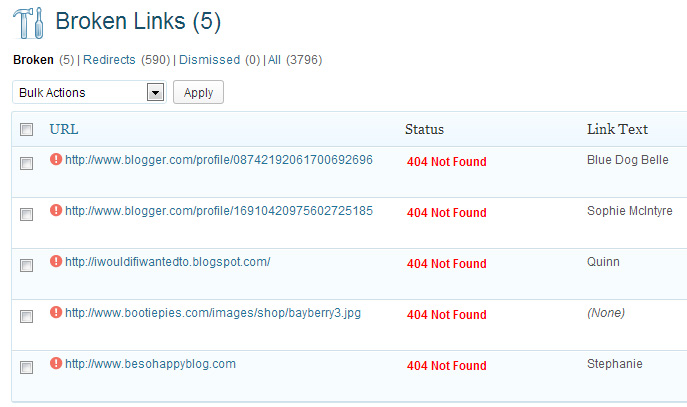
1. Broken Link Checker
This one is pretty self-explanatory. Most of the broken links I find are Blogger links (go figure) from comments. Sometimes they’re out-of-date links from Sponsor Spotlights I’ve done in the past when the Instagram or Twitter handles change. Sometimes people delete blog posts, or even delete their entire blogs, and that link you provided in your posts is now broken. I’ve even had images from group giveaways disappear because the blogger who organized it deleted that blog post and image. This plugin find the broken link and you can edit the broken link right within the plugin. You can also mark as Not Broken (this happens a lot with import comments from Blogger). It’s been a great tool!
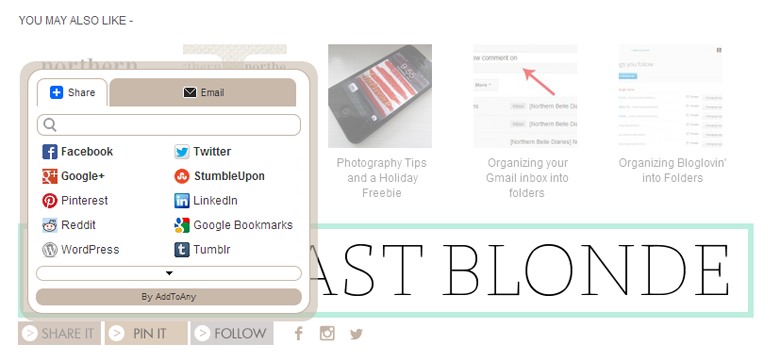
2. Share Buttons by AddtoAny
This little plugin I actually heard of through one of my clients, Glossy Blonde. She had this on her Blogger site and loved it so much that she had to have it on WordPress. This is one of those few add-ons that works on both platforms. Getting it just right requires some advanced CSS coding and tweaking to the functions.php file. If you’re too scared to do this on your own, drop me a line via e-mail and I’ll be glad to help you out!
I love this because it gives you (and your readers) an insane amount of options to share your content beyond just Facebook and Twitter and Pinterest. AddtoAny allows you to share on Tumblr, StumbleUpon, Reddit, LinkedIn, Digg, Buffer, Evernote, and a whole bunch of other platforms I’ve never even heard of. Must-have IMO.
3. Google XML sitemap
No picture for this one. It’s pretty straightforward. The plugin generates a sitemap for you (essential for SEO) and gives you its URL. All you do then is enter that URL into your Google Webmaster Tools’ sitemap field and you’re all set for optimum crawling.
In my last plugin post I spoke about Yoast SEO. While I love that it also provides you with a sitemap and the promise of one less plugin sounds appealing, the sitemap it provided me yielded many errors for Google Webmaster Tools. That’s no bueno. This plugin does the trick and continues to update that sitemap for me without me worrying about it.

4. Pinterest Pin it Button for Images
This one is also self-explanatory. I used to have the JQuery Pinterest Button but I along with Back East Blonde were experiencing difficulties with the actual Pin It button’s placement. This plugin doesn’t allow you to swap out the button for a custom one, but I’m okay with that. I’ve seen many custom Pin-it buttons and sometimes they blend in with the picture and it defeats the purpose. Everyone recognizes the Pinterest button, and for me, that’s all you need.
5. BJ Lazy load
If you’re anything like me, you got a few chuckles out of the name. No? Maybe I’m the only perve. Moving on.
This plugin is amazing for your pageload time. Treasure Tromp uses it and it’s an amazing tool for her travel pictures. What it does is prevent the browser from loading images below what’s visible on the screen when a visitor lands on your site.
How is this amazing? Well, the only images that are loaded are what’s seen on the page. Let’s say you have 5 posts with many images on your home page. That’s a LOT of page load time you are cutting off. When the visitor scrolls down, the next few images are loaded so that they appear quickly. The rest of the images are kind of on a “waiting list” and they’re not called until they come closer to “the bottom” of the visitor’s screen. Make sense?
This is great for sites that are heavy on photography. Statistics show that if your site takes longer than 3 seconds to load the person X’s out. And we don’t want that, right?
6. Wordfence
Ok. In my last plugin post I raved about WP Better Security. It’s a great plugin, except that I locked myself out of my site accidentally. I had to call my web-host company and have them deactivate all of my plugins. It was a mini-nightmare.
What I like about Wordfence is that you can see IP addresses in real-time as they try to access/hack your site. You can also block IP addresses from accessing your website/blog. This is convenient in the case of hackers and/or other people you don’t want reading your material. It works. Bwahaha.
I also like that I get e-mails about their latest findings on hacking attempts to sites due to out-of-date plugins. It’s great to be in the know and be proactive.
7. Send e-mail only on Reply to My Comment
This is a nifty one. This plugin only sends an e-mail to the person commenting if you or another reader replies to their comment. It’s convenient if you are not using a third-party plugin like Disqus and want its alerting functionality without changing the aesthetics of your comment area. You can set it to opt-in automatically (which I have set to) so that I can reply to the reader straight from my commenting system without having yet another e-mail in my Sent folder.



Kelly says
Could you also post a link to a wordpress “You Might Also Like” widget? Thanks for all the tips!
Lisette says
Sure thing Kelly! I use nRelate. I’m not sure if it’s offered for other platforms, but you have many display options that LinkWithin doesn’t offer. I like it a lot!
Rachel says
Hehe, I did chuckle at the BJ plugin name before I even read the description. These sound like very useful plug ins though, and part of why I stayed away from wordpress was that I didn’t understand a lot of those.
Lisette says
I’m glad I’m in good company ;)
There’s a definite learning curve with WordPress, and that’s why I love it. I need to be constantly learning new things.
An idle mind is a terrible thing, and as a teacher I’m sure you agree!
Niki says
Hahaha lazy load. I need that plug in!
Nicole @ Treasure Tromp says
I think that I need to try Wordfence instead of WP Better Security. I’m so nervous that I am going to accidentally lock myself out! And thanks for the shout out! Glad you like BJ Lazy Load! And the name too, of course.
Lisette says
You will like Wordfence! I like it a lot more already!
Tracey says
Hi Lisette. I just moved my blog over to Wordpress a couple of months ago as well and I’ve enjoyed reading your suggestions here and your other 7 must have plugins :) I kept seeing an error with the Google XML sitemap and couldn’t find any responses on forums so I’m trying out BMP XML Sitemap instead. Thanks a lot and I look forward to seeing some more tips in the future!
Shannon says
I’ve been looking into moving to wordpress. Any recommendations on who to use? Many of them are crazy expensive!
Anna | Eat See Do says
Well this is awesome. I’ve been on Wordpress since, well ages, and loads of people were on blogger and I thought I was a bit of a loner but now all the best peeps are on wordpress. I’m definitely not using it to its full advantage and I want to make a custom design too (many projects on the go at once!) but I’m definitely going to use some of those plugins. Thank you!
Meg O. says
Love this list! Just pinned it! I was actually just reading this tutorial on how you can actually put a custom button in using that plugin and I am literally about to try it! This is where I found the tutorial: http://www.kevinandamanda.com/whatsnew/tutorials/add-a-pinterest-mouseover-button-to-your-blog-images.html
Lisette says
I think that was one of the plugins I used before. The Pin it button appeared in odd places, not at all aligned with the images. There are so many Pinterest button plugins out there! Sometimes it’s hard to find a good one.
Christine says
This post rocks my socks. So happy to see you’re enjoying WordPress as much as I do! Thanks for these great plug in recommendations!!!
Hi from Pinterest! =)
Meg O. says
Dude, I just downloaded Wordfence. It’s AWESOME!!!!
Lisette says
Dude…it IS awesome! I’m glad you like it!
And thanks for pinning!
Jeff Golenski says
Hey Lisette!
Another plugin you may want to checkout for security is BruteProtect. They block botnets from trying to gain access to your site and do an exceptional job at it. The pro version is also a complete WP management tool that’ll let you update plugins, themes, and WP installs – which is great if you have more than one site. I recommend it! http://www.bruteprotect.com
Miriam says
Hi! Thanks for sharing all these plugins, so helpful!
I love your subscription box btw, I’m trying to set up something similar on my blog…is that also a plugin?
Congrats on your blog, it’s really amazing :)