4. WordPress SEO

WordPress SEO – I LOVE this plugin! It guides you on optimizing each and every post and page for the search engines. It lets you know whether it’s optimized (green light), needs some more work (yellow light), or has no optimization (red light). In the image above, I’ve placed red X’s on where the plugin let me know that SEO optimization needed help. In a nutshell, you want your SEO keyword to appear in your content, your meta description, your post’s URL, its title, and it’s special SEO title that the plugin is creating. It’s possible to have a one title for your post and a different one appear as it’s SEO title for search results, but the plugin recommends they match for a better impact.
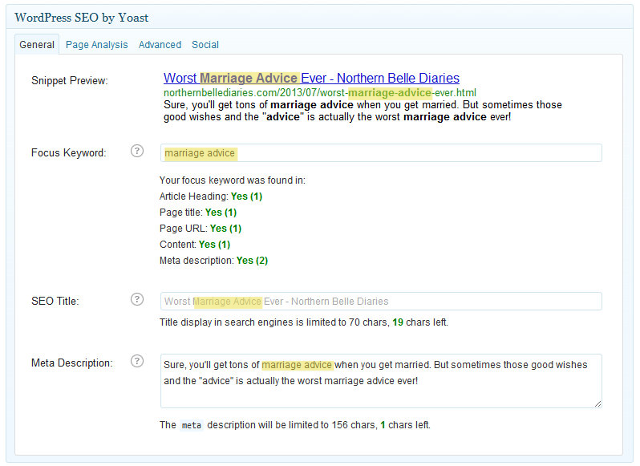
Above is an example of excellent SEO optimization. All the requirements are in green, and I’ve highlighted the specific targets in each item in yellow. As you can see, the meta description I wrote ends up being the description of the post that shows up in search engine results (snippet preview). Ensuring that your keyword appears in the meta description optimizes your search engine results! Love it!
5. WP-Optimize
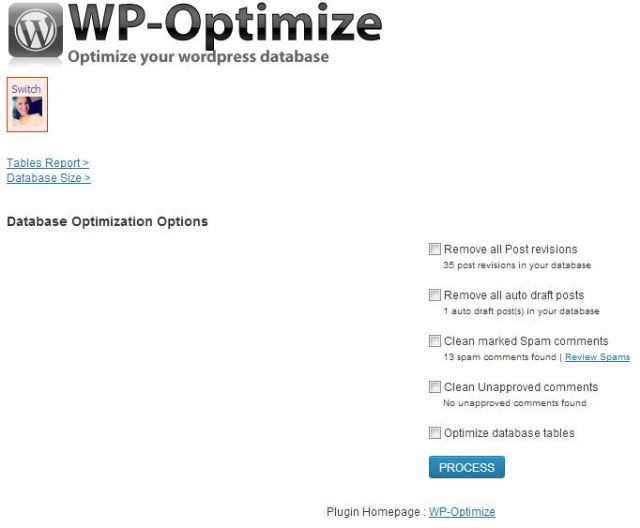
WP-Optimize: clearing cache of draft posts. I don’t know about you, but each of my posts has about 16 or more revisions. This particular one had over 40. WP saves each revision of your draft as a separate post. This is extremely useful in case something happens and you need to revert back to an earlier revision! After a while, these revisions can slow down your site because there’s so much stored data. At one point, I emptied the cache of over 500 post revisions!
6. Limit Login Attempts
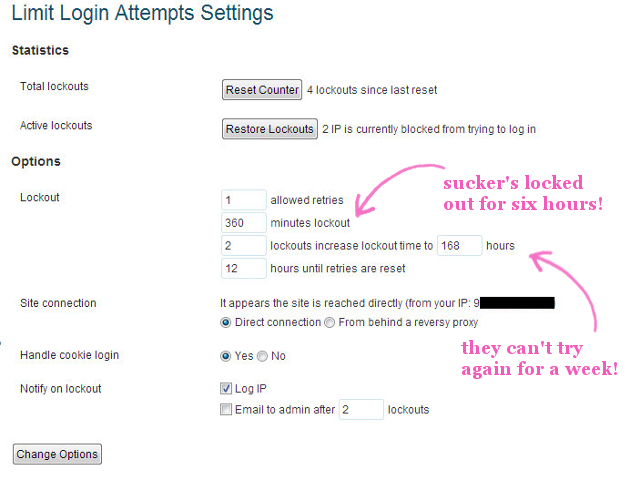
Limit Login Attempts – By default WordPress allows unlimited login attempts. This plugin blocks an IP address from making further attempts after your specified limit on retries is met. It also allows you to limit the number of retry attempts when logging in. Look, I know my password, and the probability of me typing in that password incorrectly is pretty low. That’s why I set it to only one retry. If I can’t get my own password in on the retry, I probably shouldn’t be logging in to my account.
7. Better WP Security
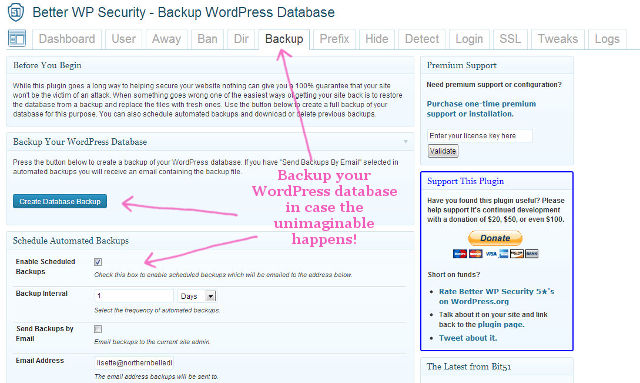
Better WP Security – Database backup. Need I say more? As a self-hosted blogger, I and I alone am responsible for ensuring that my site can be recovered in case it’s hacked. Will it be hacked? Not likely, but I have already have several measures to make it difficult to hack my site. The first is the Limit Login Attempts plugin. This is the second one. Another good security plugin is Wordfence. That one allows you to block certain IP addresses from reaching your site (useful for crazy exes or other negative people.



Codi says
Lisette! This is exactly what I needed today. Thank you for helping me learn just a little bit more about WordPress and what it has to offer!
Lisette says
You’re welcome, Codi! I just saw your site. How long have you been on Wordpress?
Rachel says
Wordpress is so dang scary!
Lisette says
Don’t be scared! I’ll hold your hand if you want to make the switch. I seriously am in love with WordPress!
Adela says
I have some of these. Now I’ll get more. I appreciate your explaination of SEO. I’ve been bumbling along trying to figure out what it’s about and how to use it. I also plan to limit login attempts. Thanks o much for your help.
Kelly says
I need to get Wordpress and then download these, thanks for the recommendations!
xx
Kelly
Sparkles and Shoes
Nicole @ Treasure Tromp says
Editorial Calendar is seriously my best friend. I love the first 5 plugins but need to check out the last two!
Chania @ Sassy Sweet Style says
This is AWESOME! I have been on Wordpress since the beginning of my blogging, but recently switched to self hosted a few months ago. I never went plug-in shopping because there were so many. Just installed the ones I didn’t have. THANK YOU! :)
♥Chania
Michelle says
These are all GREAT plugins to have! I definitely recommend them as well.
Meg O. says
And off I go to download #5-7!
Kate says
I am definitely going to check out the SEO plug in- thanks!
Tami says
Okay–this might be the dumbest question on the planet, but you can only use these if you use wordpress, right? I use Blogger but I’m so confused by all the different platforms. Then throw in the concept of ‘self hosting’ and I’m lost!
Lisette says
No question is dumb :)
But yes, these are only available on WordPress.org sites aka self-hosted blogs. Not to be confused with WordPress.com sites that are free but extremely limited.
Brooks says
Oh my gosh! So many options! I’ve been thinking about switching – not being really happy with the whole Blogger app, and wanting to see different options, but it’s so intimidating! I love, love, love your design and how it all seems to flow – where BlogSpot doesn’t seem to as well. You’ve really got me thinking about switching.
Lisette says
I thought about making the switch for several months before I committed. Thanks for your kind words! I’m also available for Blogger designs!
joannerambling says
I don’t know if I have any of these but that is not a surprise I know bugga all about computers……………lol
Lisette says
No worries! We all have to start somewhere :)
Niki says
Where can you see your JetPack statistics on the dashboard? I may be dumb but I can’t find it! Also, you say it takes about a month for your pageviews to climb back up after transferring to Wordpress, could that be why my Google Analytics settings are showing, like 4 pageviews when I know I’ve received many more?
Thanks Lisette!
Lisette says
Hmm. Did you insert your Google Analytics meta tag into the < head > portion in WordPress? I can email you a screenshot of what that looks like. Same thing happened to me until I figured out I forgot to enter that tag.
Rachel says
Thank goodness you wrote this. I’m going to be so lost in a few weeks!
Belinda says
I have been looking for a good WP plugin for backups! THANK YOU! My blog was hacked last year and it was the worst moment… ever. I lost everything and had to start from scratch. Never again!!
happyeverafterbride says
Thanks for sharing. I already use the majority of these but have downloaded WP-Optimize now. Did wonder why my pages took so long to load at work and now I think it’ll be much better. I just moved to self hosting from blogger and this platform is just so daunting if not for plugins!
Megan says
Thank you, Lisette! I just started my blog this past week and have no idea what I’m doing. I only have Akismet loaded up right now, but will def be downloading the other six TODAY.
Stephanie says
Not quite on topic, but I have been using wordpress for months and always thought when I hit approve and reply in comments that I was emailing the person back. I now find out I was not and it only posted on my blog. Do you know how I can fix that so I can do both email back to the commentor and post it on my blog? I did find a plug-in called Comment Email Responder and it was working okay. This week when I activated JetPack after reading your post, it no longer works. I am hoping you can lead me in another easier direction.
Thanks
Kerri says
Just installed the last three and also WordFence! These are super helpful! Thanks for posting this! :)
kim says
Thanks for posting this it’s extremely helpful. Do you use a specific widget for newsletter/direct subscribers to your blog too? Would love a recommendation. My friend told me that sending entire posts directly to subcribers is bad–wondering what you think?
KBS
Andrea says
I know I’m waaaaay late to this party, but I’m late to everything so it’s par for the course, plus I’m new (and stupid) to everything so every little bit helps. The SEO plugin is amazing. Thanks so much for the tip!
Lisette says
You’re so welcome! The plugin has totally helped me get my business in order!
Sierra says
This is so great and helpful – thanks for the review! Will have to check out WP-Optimize – I didn’t know that existed – very cool! ~ Sierra
samdani says
Plugins are very much tonic to make the wordpress more perfect . Mainly a dynamic website for special purpose is being promoted and acceptable to traffic by using plugins .
I have seen , many wordpress users have used these plugins you suggested and they are really useful. Thanks for your helpful wordpress plugin list.